

After a long time, I finally found a gaming laptop that genuinely stands out again. The Lenovo Legion series has always been a personal favourite, and the new Legion 7 (2026) brings back that excitement.
If you’ve been following Lenovo’s lineup, you might remember the Legion Slim series from a couple of years ago. That lineup has now been discontinued, and Lenovo has streamlined things by focusing on the main lenovo Legion 7 series.
And honestly, this version feels like a perfect evolution.
Build & Design
Let’s start with the design, because this is where the Lenovo Legion 7 (2026) really impresses. At first glance, the laptop looks clean and premium. The Legion branding is subtly engraved on the top lid, giving it a minimal yet classy appearance. If you’re someone who prefers a non-flashy gaming laptop, this design works perfectly.
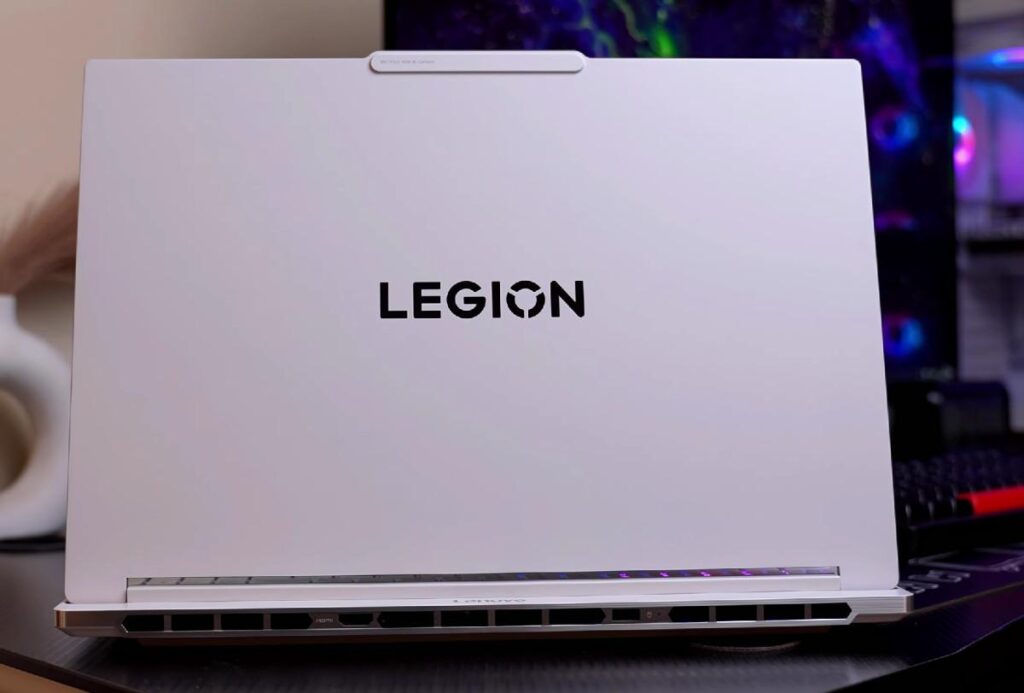
Full Aluminium Build
Unlike previous generations, this model features a full aluminium chassis. Earlier, only the top and bottom panels were metal, but now the entire body is aluminium.
- Better durability
- More premium feel
- Improved overall build quality
On the sides, you’ll notice a chrome finish, which adds a nice touch and makes the laptop feel even more high-end.
Slimmer and More Refined Than Before
Lenovo has made noticeable improvements in design compared to last year.
- Thickness reduced from 19.8mm to 17.9mm
- Slightly more curved edges for a smoother look
- Updated Legion logo placement
These small changes make a big difference in hand feel and overall aesthetics.
Weight & Portability
For a gaming laptop with high-end specs, the weight is surprisingly well managed.
- Laptop weight: 1.95 kg
- With charger: around 2.6–2.7 kg
This makes it one of the more portable gaming laptops in its category, especially considering the hardware inside.
Cooling System: Advanced Thermal Design
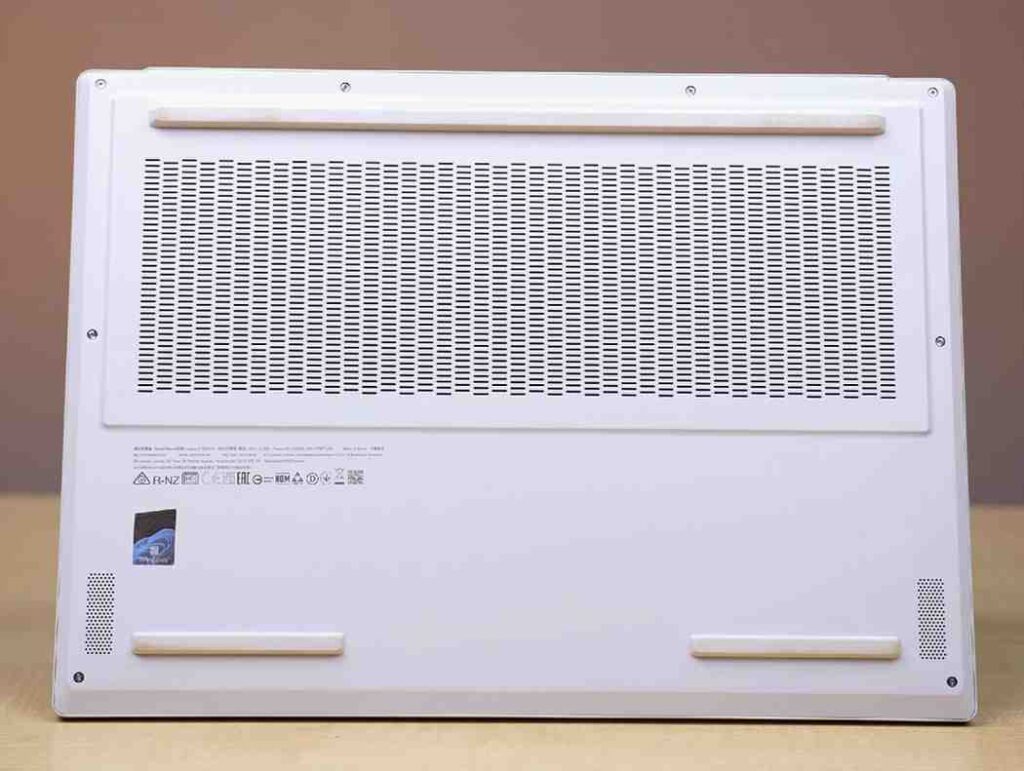
Cooling is always a challenge in slim gaming laptops, but Lenovo has done a solid job here. In simple terms, the internal structure acts like a chamber that helps distribute heat more efficiently. When the fans spin, airflow improves, resulting in better cooling performance. What sets the Lenovo Legion 7 apart is its combination of style and substance, making it a favourite among gamers and professionals alike.
- Legion Coldfront vapor cooling system
- Hyper chamber thermal design
- Air intake vents are placed at the bottom
- Exhaust vents are located at the rear
- No side exhausts, which keeps hot air away from your hands
Fitting an Intel Core Ultra 9 in such a slim body is not easy, and thermal management plays a crucial role here. I tested this laptop under heavy load, and we’ll look at the performance results later.
Build Quality & Hinge Mechanism
The build quality of lenovo Legion 7 is excellent overall.
- Minimal top lid flex
- Negligible keyboard flex
- Can be opened single-handedly
- Supports 180-degree hinge
One of Legion’s standout features is stability, and that continues here. There is almost no screen wobble, even while typing or adjusting the angle.
Specifications
Now let’s get into the core hardware of the Lenovo Legion 7 (2026), and this is where things start to get serious.
| Feature | Specification |
|---|---|
| Processor | Intel Core Ultra 9 275HX, up to 5.4GHz |
| Cores / Threads | 24 Cores / 24 Threads (8 P-Cores + 16 E-Cores) |
| NPU | Dedicated Neural Processing Unit, 13 TOPS |
| RAM | 32GB DDR5 6400MT/s (2x16GB), upgradeable to 64GB |
| Graphics | NVIDIA GeForce RTX 5070 8GB, 115W TGP |
| Storage | 1TB Gen 4 SSD, dual full-size SSD slots |
| Storage Upgrade | Supports up to 2TB per slot, no Gen 5 slot |
| Connectivity | Wi-Fi 7, Bluetooth 5.4 |
| AI Features | Lenovo LA-1 & LA-3 chips for intelligent CPU/GPU power optimization |
Processor: Intel Core Ultra 9 275HX
60 seconds
| Base speed: | 2.70 GHz |
| Sockets: | 1 |
| Cores: | 24 |
| Logical processors: | 24 |
| Virtualization: | Enabled |
| L1 cache: | 2.4 MB |
| L2 cache: | 40.0 MB |
| L3 cache: | 36.0 MB |
The laptop is powered by the Intel Core Ultra 9 275HX, a high-end processor designed for demanding workloads.
It also includes a dedicated NPU (Neural Processing Unit) with around 13 TOPS of AI performance. That said, in a gaming laptop like this, the GPU handles most AI workloads. NPUs are more useful in thin and light laptops, while here, the GPU already delivers strong AI capabilities. I’ll cover real AI performance later in the review.
RAM
| Speed: | 6400 MT/s |
| Slots used: | 2 of 2 |
| Form factor: | SODIMM |
| Hardware reserved: | 579 MB |
You can upgrade it up to 64GB, which is great for future-proofing. There is no 16GB base variant, so the entry price is higher. However, Lenovo does offer a slightly slower 5600 MT/s RAM option, which can save you some money if you’re on a budget.
GPU RTX 5070 with 115W TGP
| Max-Q Technologies | Yes |
| Dynamic Boost | Yes |
| WhisperMode | No |
| Advanced Optimus | No |
| Maximum Graphics Power | 115 W |
| Graphics Boost Clock | 1425 MHz |
| Memory Data Rate | 24.00 Gbps |
| Memory Interface | 128-bit |
| Memory Bandwidth | 384.03 GB/s |
| Total Available Graphics Memory | 24245 MB |
| Dedicated Video Memory | 8151 MB GDDR7 |
Gamers looking for a reliable machine will find the Lenovo Legion 7 to be an invaluable companion in their gaming adventures. The Lenovo Legion 7’s performance is enhanced by its cutting-edge NVIDIA GPU, which can run the latest games at high settings. With the Lenovo Legion 7, users can expect top-notch graphics and smooth gameplay, making it a top contender in the gaming segment.
Storage
The laptop includes:
- 1TB PCIe Gen 4 SSD
- Solid read/write speeds (as expected from Gen 4)
More importantly:
- 2 full-size SSD slots
- Supports upgrades up to 2TB per slot
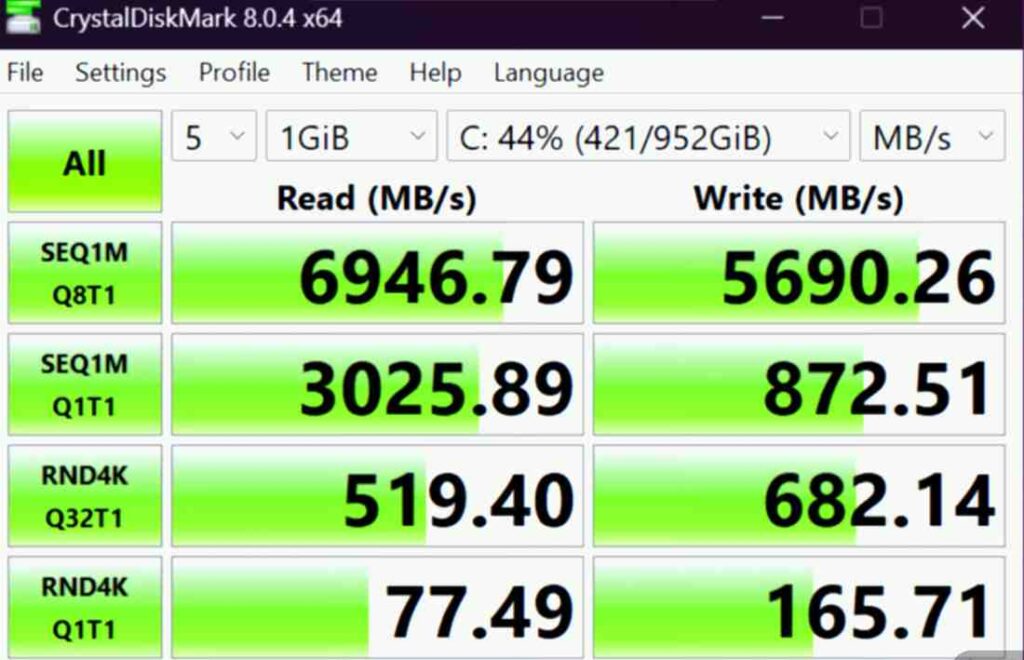
One downside is that it does not include a Gen 5 slot, which you might expect at this price point. Still, Gen 4 speeds are more than enough for most users.
Connectivity: Future-Ready
Lenovo has included the latest connectivity options:
- Wi-Fi 7
- Bluetooth 5.4
This ensures faster wireless speeds and better stability for the coming years.
Lenovo AI Chips (LA-1 & LA-3): Smart Performance Tuning
One of the more interesting additions is Lenovo’s LA-1 and LA-3 AI chips.
These chips work in the background to:
- Detect usage scenarios
- Dynamically adjust CPU and GPU power
- Optimize performance for better FPS
Unlike traditional systems, this AI engine learns from your usage over time. It is not pre-trained, which means the optimization improves the more you use the laptop.
In simple terms, the system automatically balances power between CPU and GPU to give you the best possible performance in real-world usage.
Performance & Benchmarks
| Benchmark | Result |
|---|---|
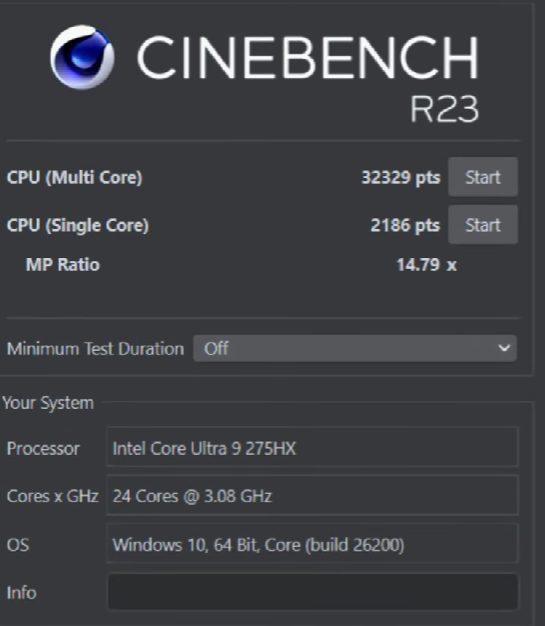
| Cinebench R23 | 32,000+ multicore, 2100+ single-core |
| Geekbench 6 CPU | Strong single-core and multicore performance |
| Geekbench AI | Solid GPU-based AI benchmark results |
| LM Studio / DeepSeek R1 32B | Task completed in around 4 minutes 7 seconds |
| Blender Benchmark | 4200+ score |
| BMW Render Test | Completed in 16 seconds |
| Photoshop (PugetBench) | 9600+ |
| Premiere Pro | 10,000+ |
| After Effects | 11,000+ |
| 3DMark Time Spy | Strong CPU and GPU performance |
| Geekbench 6 OpenCL | 146,000+ |
| VRMark | 17,000+ |
| PCMark 10 / CrossMark | Strong all-round system performance |
| CPU Stress Test | 108°C max, 91°C avg, 163W max, 5.18 GHz max |
| GPU Stress Test | 84°C max, 81-82°C avg, 122W max power draw |
The laptop delivers excellent results across the board. In Cinebench 2024, the scores are impressive, and in Cinebench R23, we recorded a multicore score of 32,000+ and a single-core score of 2100+. These numbers clearly show that this machine can handle demanding workloads with ease.
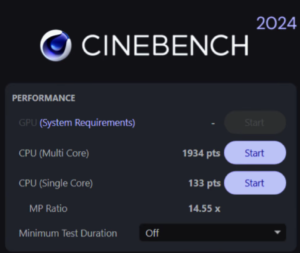
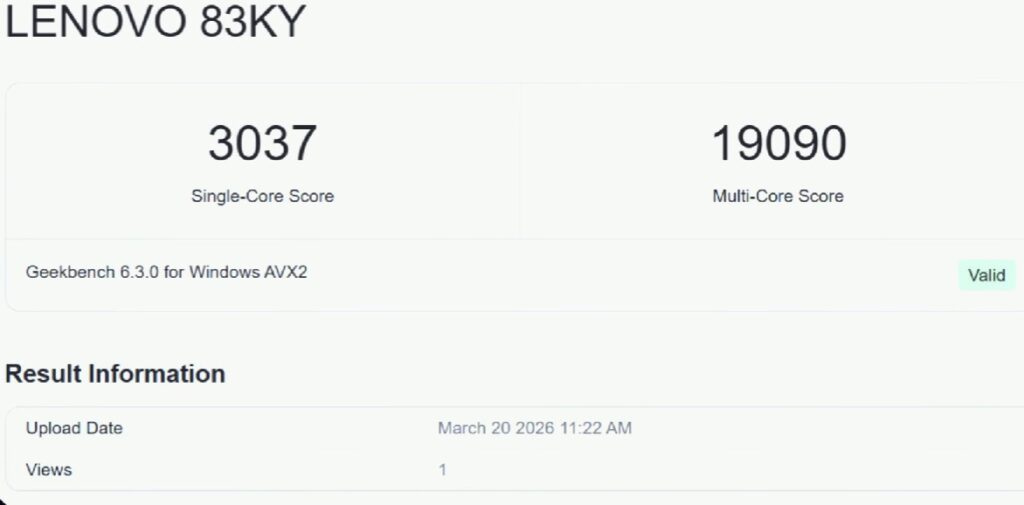
We also tested Geekbench 6, both single-core and multicore, and the results were equally strong. Overall, this is a flagship-level processor, positioned just below the higher-tier HX series. It’s more than capable for tasks like coding, music production, and other CPU-intensive workloads.
AI & Machine Learning Performance
For AI performance, we ran Geekbench AI benchmarks on the GPU, and the results were solid.We also tested a real-world scenario by running the DeepSeek R1 32B model using LM Studio. Using a consistent prompt across systems, the model completed the task in around 4 minutes and 7 seconds.
LENOVO 83KY
Geekbench AI Score
This shows that the laptop is capable of handling AI workloads effectively. With 8GB VRAM, 32GB RAM, and a powerful processor, the system uses all three together for better AI performance.
This makes it a great option for:
- Data science students
- Machine learning tasks
- AI experimentation and development
3D Rendering & Creative Work
For 3D workloads, the performance is also strong. In Blender benchmark, the score crossed 4200+, and a BMW render completed in just 16 seconds. That’s a very solid result for this price segment.
This laptop will handle it without issues. For context, higher-end GPUs like the 5080 and 5090 offer more power, but they also come at a much higher price. This laptop strikes a good balance between performance and cost.
Video Editing & Design
When it comes to creative software, the results are equally impressive:
Benchmark Result
PugetBench for Photoshop 1.0.0-1.0.6
Intel Graphics
These scores show that you can comfortably run Adobe apps like Photoshop, Illustrator, and After Effects without lag, even on larger projects.
GPU & Graphics Performance
For graphics performance, we ran several tests:
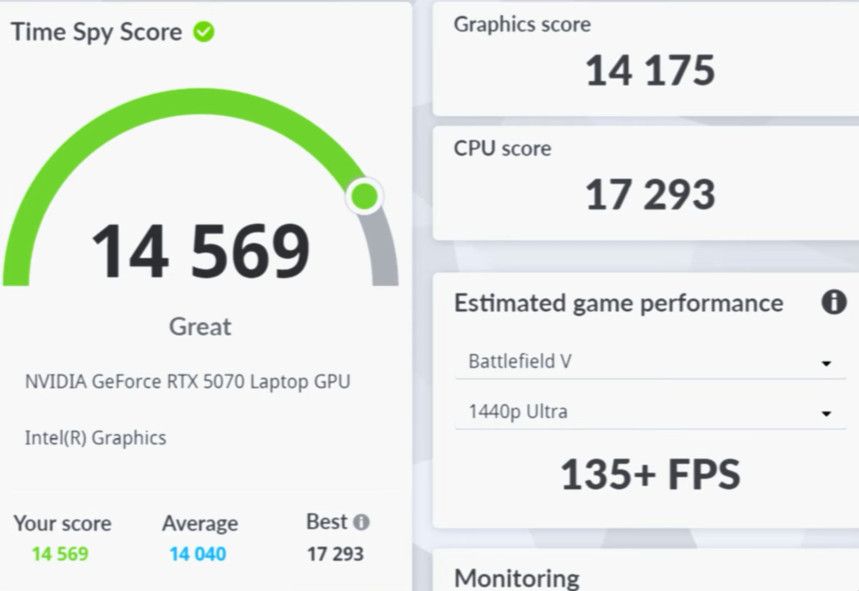

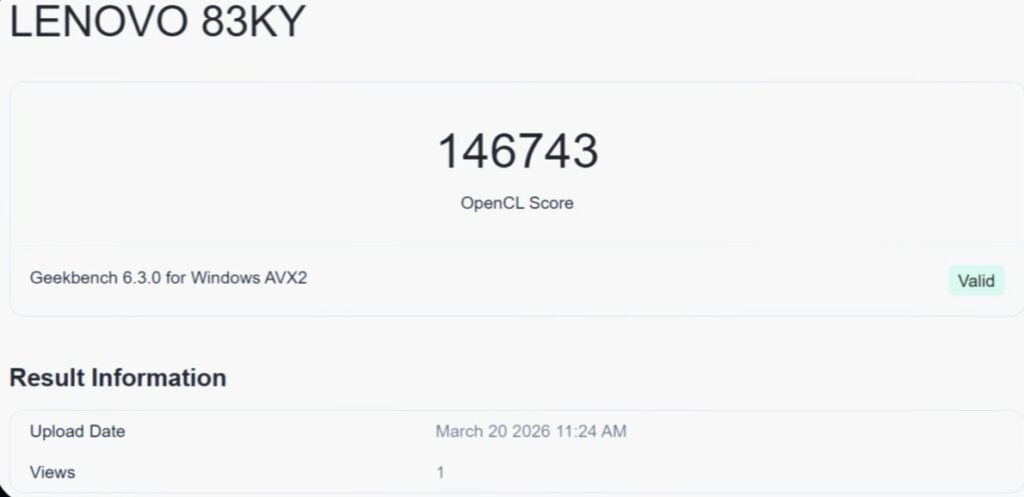
While this GPU is not on the same level as the 5080 or even 5070-class GPUs, it still delivers excellent performance for its category. Compared to lower-tier GPUs, the difference is clearly noticeable in benchmarks and real-world use.
Overall System Performance
Tests like PCMark 10 and CrossMark confirm strong overall system performance. You can pause and review the benchmark numbers if you want to compare them with other laptops. In general
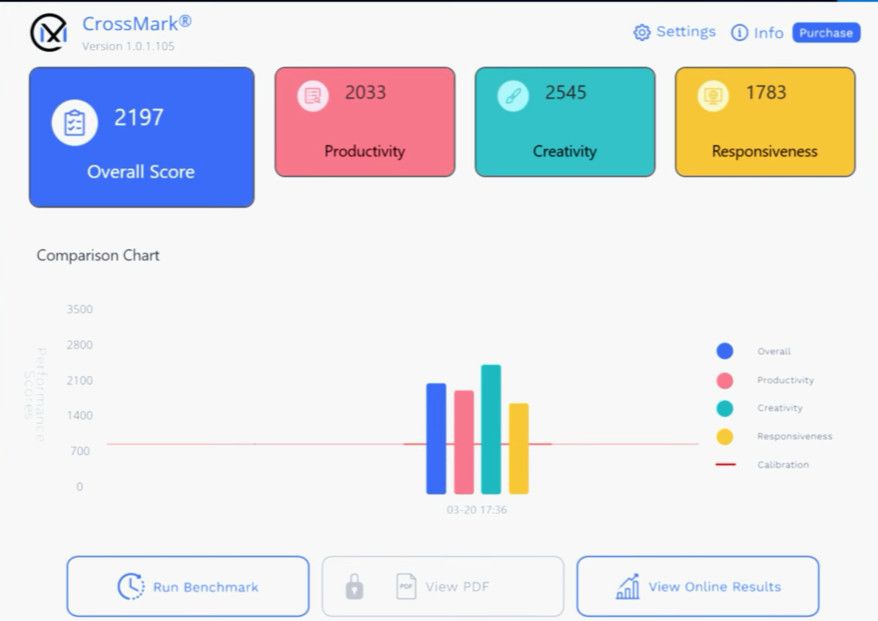

- Higher scores = better performance
- Lower time-based results (like rendering) = better performance
Thermals & Stress Testing
To push the system to its limits, we ran Prime95 for one hour at 100% CPU load.
System Stress Test Report
CPU Stress Test
| Metric | Value |
|---|---|
| Maximum temperature | 108°C |
| Average temperature | 91°C |
| Maximum power draw | 163W |
| Average power | 95W |
| Maximum clock speed | 5.18 GHz |
| Average clock speed | 3.2 GHz |
GPU Stress Test
| Metric | Value |
|---|---|
| Maximum temperature | 84°C |
| Average temperature | 81–82°C |
| Maximum power draw | 122W |
| Average power | 105W |
Gaming Performance Test
| Game | Settings / Resolution | Performance |
|---|---|---|
| Valorant | 1600p, native resolution | Up to 500 FPS |
| CS2 | Very High settings | Around 200 FPS average |
| GTA 5 Enhanced | Maximum + Ray Tracing | 55-60 FPS average |
| Elden Ring | Maximum settings + Max Ray Tracing | Locked 60 FPS |
| RDR2 | Highest / Favor Quality, DLSS Off & On | 70-80 FPS |
| Cyberpunk 2077 | Ultra settings | 55-60 FPS, up to 100-120 FPS with Frame Generation |
| Cyberpunk 2077 RT Ultra | Ray Tracing Ultra | 20-25 FPS raw, 70-75 FPS with Frame Generation |
| Hogwarts Legacy | Ultra + RT Ultra | 60 FPS, 120+ FPS with Frame Generation |
| Assassin’s Creed Shadows | Ultra High | 50-60 FPS with DLSS Frame Generation |
| The Last of Us Part II | High settings | 45-50 FPS raw, around 100 FPS with Frame Generation |
| Horizon Forbidden West | Very High | 60 FPS, only about 10 FPS gain with Frame Generation |
| Ghost of Tsushima | Very High | 60 FPS raw, around 120 FPS with Frame Generation |
| Hellblade 2 | Very High, 1600p | 15-20 FPS raw, around 40 FPS with Frame Generation |
| Spider-Man 2 | Very High | 40-45 FPS raw, around 80 FPS with Frame Generation |
| Spider-Man 2 RT | Very High + Ray Tracing | 20-25 FPS in heavy scenes, even with Frame Generation |
| Black Myth: Wukong | Cinematic | Around 60 FPS with Frame Generation |
| Black Myth: Wukong RT | Very High + Ray Tracing | Poor raw FPS, around 30 FPS with Frame Generation |
| Black Myth: Wukong MFG | 3x / 4x Multi-Frame Generation | 40-60 FPS, with some input lag |
| Alan Wake 2 | High settings | 35-40 FPS raw, 80-90 FPS with Frame Generation |
| Alan Wake 2 RT Ultra | Ray Tracing Ultra | Low raw FPS, better with Frame Generation and Multi-Frame Generation |
Thermals & Battery: CPU temperatures stayed mostly between 80°C and 92°C depending on the game and workload.
Surface Temperature: Keyboard area remained around 30°C to 31°C, while the top section reached about 38°C.
Battery Behavior: During gaming, battery percentage only fluctuated slightly from around 98-99% to 96-97%, without continuous drain.
Ports and Connectivity
Performance enthusiasts will appreciate how the Lenovo Legion 7 handles demanding tasks effortlessly.


| Location | Ports / Features |
|---|---|
| Right Side | USB 3.2 Gen 1 Type-A, E-shutter button for webcam, full-size SD card slot |
| Left Side | USB 3.2 Gen 1 Type-A (Always-On charging), USB 3.2 Gen 1 Type-C, Thunderbolt 4 |
| Rear Side | Power input, HDMI 2.1 |
USB Type-C: Supports display output up to 4K 240Hz through the RTX 5070 and also supports 100W Power Delivery.
Thunderbolt 4: Supports display output via Intel integrated graphics with DP 1.4 and also supports 100W Power Delivery.
HDMI 2.1: Output is routed through Nvidia graphics and supports up to 8K 60Hz or 4K 240Hz.
Missing Port: There is no RJ45 LAN port, so wired Ethernet requires an external dock or adapter.
Extra Feature: The laptop also includes a MUX switch for better graphics management.
MUX Switch
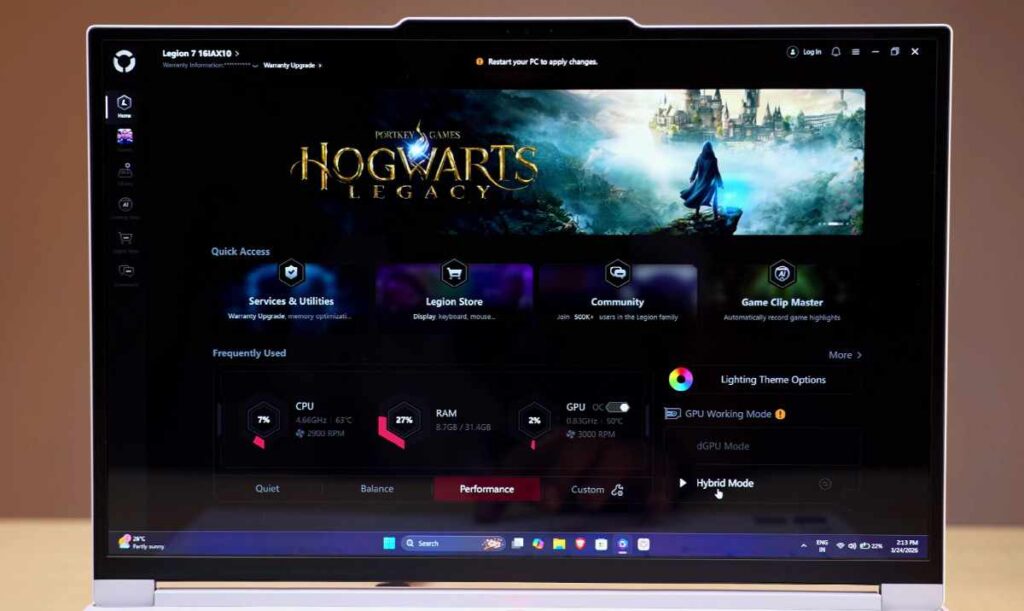
The Lenovo Legion 7 (2026) comes with a MUX switch, which is an important feature for both gamers and power users.
In simple terms, the MUX switch lets you control how the laptop uses its graphics:
- iGPU (Integrated Graphics) – built into the processor
- dGPU (Dedicated GPU – RTX 5070)
How It Works?
The MUX switch allows you to directly change the display output between the iGPU and dGPU depending on your usage.
Keyboard & Trackpad
The Lenovo Legion 7 (2026) continues to use the reliable Legion True Strike keyboard, and the experience is genuinely solid for both gaming and everyday typing. You get 1.67mm key travel, which provides a good balance between comfort and responsiveness, making long typing sessions easy and gaming inputs precise.
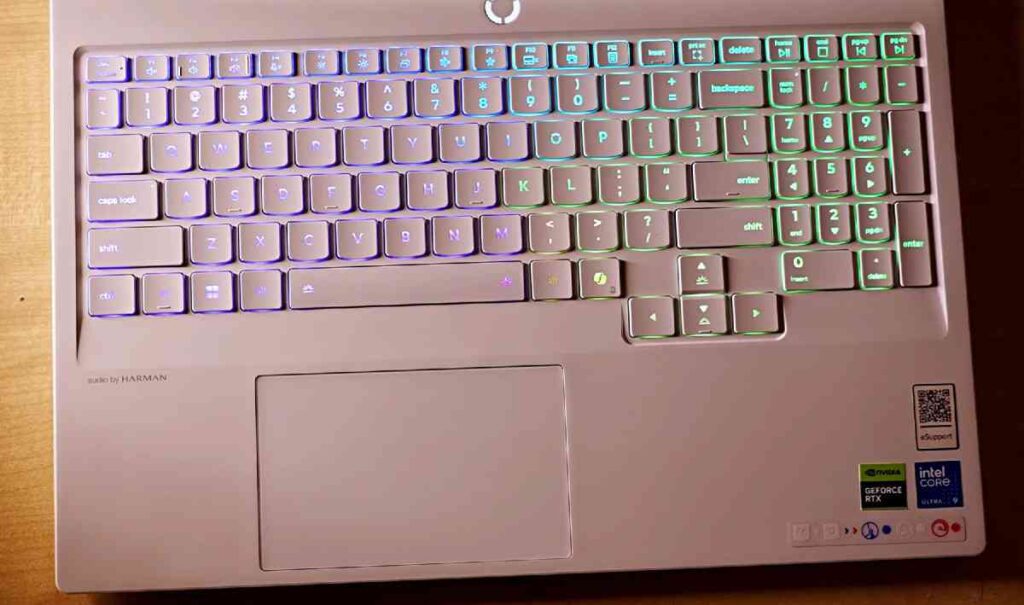
The keyboard also features per-key RGB lighting, which you can fully customise through the Lenovo Vantage software. Lenovo has included a Copilot key, which can be useful for quick AI-related tasks. One thing that stands out is how well the RGB lighting complements the laptop’s white colour variant, giving it a clean, premium look.
- 1.67mm key travel for comfortable typing
- Fully customizable per-key RGB
- Smooth and responsive trackpad
- Clean look, especially on white model
Coming to the track-pad, it is medium-sized but performs well in daily use. It feels smooth, supports multi-gesture controls, and responds accurately. While it may not be the largest track-pad in this segment, it is reliable and gets the job done without any issues.
Display Premium OLED Experience
| Feature | Details |
|---|---|
| Panel Type | 16-inch OLED display |
| Resolution | WQXGA (2560 x 1600), 1600p |
| Refresh Rate | 240Hz with Variable Refresh Rate support (60Hz to 240Hz) |
| Color Depth | 10-bit |
| Brightness | Around 498 nits in regular usage, up to 1000 nits in HDR (10% window) |
| Color Gamut | 100% sRGB and 100% DCI-P3 |
| Surface | Glossy finish with visible reflections |
| Certifications | DisplayHDR True Black 1000, Dolby Vision, NVIDIA G-Sync, TUV Low Blue Light, TUV Rheinland Flicker Free |
| Alternative Option | 165Hz OLED variant available for about Rs 1,400 less |
The Lenovo Legion 7 (2026) features a 16-inch WQXGA (1600p) OLED display with a 240Hz refresh rate, making it one of the best panels in this segment. It supports VRR (60Hz–240Hz), though it doesn’t work in dGPU mode. Being a 10-bit glossy OLED, you get deep blacks, vibrant colors, and excellent contrast, but reflections can be noticeable.
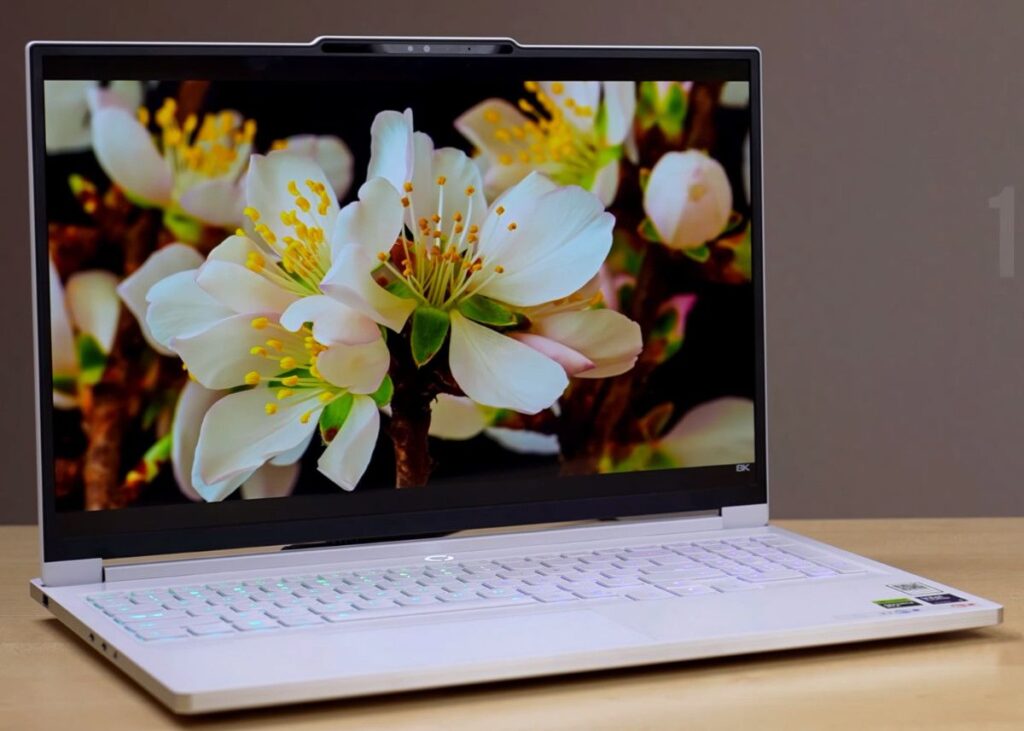
Display Quality: This is a premium OLED panel that is excellent for gaming, multimedia, Content creation, and colour grading work.
VRR Note: Variable Refresh Rate works between 60Hz and 240Hz, but it does not function in dGPU-only mode.
OLED Protection: Lenovo includes built-in anti-burn-in measures along with extra options like taskbar dimmer, background dimmer, display dimmer, and additional screen protection settings in Legion Space and Vantage.
Recommendation: The 240Hz panel is the better option and is worth paying a little extra for over the 165Hz version.
Webcam, Mic & Speakers
The Lenevo Legion 7 includes a 5MP (1440p) webcam with good clarity and an IR sensor for face unlock, which works smoothly. The microphone quality is clear for calls.
You also get dual 2W speakers, which are decent but not very loud—fine for normal use.
- 5MP webcam with good quality
- Face unlock support
- Clear mic
- Average speaker loudness
Software
| Software | Purpose |
|---|---|
| Lenovo Vantage | Main control center for power modes, performance, sound, input, and overall system settings. |
| Legion Space | Gaming-focused hub with real-time system stats, performance modes, GPU settings, RGB controls, and game library management. |
| Game Store Integration | Lets you compare game prices across supported stores. |
| Gaming Clip Master | Allows gameplay recording with customization options for clips and captures. |
| Game Companion | Provides in-game alerts such as kills, achievements, and other supported notifications. |
| Legion Store & Community | Access to Lenovo’s gaming ecosystem, store content, and community features. |
| Nahimic Audio | Lets you tune sound profiles for gaming, movies, music, and general use. |
Battery & Charging
| Battery & Charging | Details |
|---|---|
| Battery Capacity | 84Wh |
| Battery Backup | Around 3 to 3.5 hours in office productivity use |
| Adapter | 245W charger |
| Fast Charging | 50% charge in 30 minutes |
| Full Charge Time | About 1 hour 10 minutes |
The Lenovo Legion 7 (2026) offers average battery life, which is expected from a high-performance gaming laptop.
In real-world testing with iGPU mode, 50% brightness, no keyboard backlight, and typical office tasks (including YouTube playback), the laptop delivered around 3 to 3.5 hours of battery backup. With lighter usage and better optimization, you can stretch it to around 4–5 hours, but anything beyond that isn’t realistic for this category. Compared to the previous generation’s 99.9Wh battery, this model comes with an 84Wh battery, likely due to the slimmer design.
Comparison with legion pro Series
| Comparison Point | Legion 7 | Legion Pro Series |
|---|---|---|
| Design | Slim, clean, premium laptop | Thicker, bulkier desktop-replacement design |
| Build | Full aluminium body | Metal + plastic construction |
| Thermals | Runs hotter under full load due to slimmer chassis | Better long-term thermal performance with thicker chassis |
| Cooling System | Slim cooling setup | Better thermal system, including 3 fans on Pro 7 |
| Battery | 84Wh | Up to 99.9Wh on Pro 7 |
| Ports | Good selection, but no RJ45 LAN | More ports, including RJ45 LAN and extra USB-A |
| RGB | Minimal and clean | More RGB lighting options |
| Weight | Slimmer and easier to carry | Heavier and bulkier, around 2.2kg for Pro 5i |
| Base Configuration | 32GB RAM + 1TB SSD | Pro 5i starts with 16GB RAM + 512GB SSD |
| GPU Options | Good choice if buying up to RTX 5070 | Pro 7 starts from RTX 5070 Ti and goes up to RTX 5090 |
| Best For | Users who want a premium, slim gaming laptop | Users who want a bulky desktop-replacement with better thermals and ports |
Conclusion: Should You Buy the Lenovo Legion 7 (2026)?
The Lenovo Legion 7 (2026) strikes a strong balance between performance, portability, and premium design. It’s not trying to be the most powerful desktop replacement, but instead focuses on delivering high-end specs in a slim and lightweight form factor.
You get a lot here—powerful Ultra 9 processor, RTX 5070 GPU, stunning OLED display, and a full aluminium build—which makes it ideal for gamers, creators, and professionals who want performance without carrying a bulky machine.
However, it’s not perfect. Battery life is average, and features like the missing LAN port or lack of Thunderbolt 5 might matter to some users. Also, due to its slim design, thermals can get slightly higher under heavy load compared to thicker models like the Pro series.
In simple terms:
- Go for it if you want a premium, slim gaming laptop with top-tier display and solid performance
- Skip it if you prefer maximum cooling, more ports, or a desktop replacement setup
Overall, the Lenovo Legion 7 (2026) is a well-rounded flagship laptop that stands out for its design and display, while still delivering strong real-world performance.
Is the Lenovo Legion 7 (2026) good for gaming?
Yes, it is a powerful gaming laptop with RTX 5070 and Ultra 9 processor, making it capable of handling modern AAA games smoothly at high settings.
How is the battery life on Legion 7?
Battery life is average for a gaming laptop. You can expect around 3–5 hours depending on usage, which is normal for this category.
Does the Legion 7 have overheating issues?
The laptop uses an advanced cooling system, and while temperatures can rise under heavy load, it manages heat reasonably well for its slim design.
Is the OLED display safe from burn-in?
Yes, Lenovo includes built-in burn-in protection features along with tools in Lenovo Vantage and Legion Space to reduce the risk.
Can I upgrade RAM and storage?
Yes. The laptop supports upgrades:
RAM up to 64GB DDR5
Storage up to 2TB per slot (dual SSD slots)
Is it good for content creation?
Absolutely. With 100% DCI-P3 colour accuracy and OLED display, it is great for:
Video editing, colour grading, Photo editing,……………

