

A few years ago, comparing a Windows laptop to a MacBook wasn’t much of a debate. For productivity, battery life, and efficiency, Apple had a clear lead thanks to its unified memory architecture.
Windows laptops relied on separate CPU and GPU configurations, and even with newer chips, there was still a gap in power efficiency and battery life. Now, that’s changing.
With AMD’s Ryzen AI Max series, Windows laptops can use a more unified approach, allowing the integrated GPU (iGPU) to share memory and boost performance significantly. That’s why comparing the Asus TUF A14 and the MacBook Pro M5 is more relevant than ever. One focuses on gaming performance, the other on efficiency and optimization.
So, which one should you buy in 2026?
Specifications
Now let’s look at the core specs of the Asus TUF A14 vs MacBook Pro M5. Both use different architectures, so the real differences come down to memory, storage, and flexibility.
The TUF A14 offers 32GB LPDDR5X RAM (8000 MT/s), while the MacBook comes with 16GB LPDDR5X (9600 MT/s). Despite higher speed on paper, the TUF has double the memory, which helps in multitasking and heavier workloads.
For storage, the TUF A14 includes a 1TB SSD with fast ~7000 MB/s read and ~5800 MB/s write speeds, plus an extra upgrade slot. The MacBook starts with 512GB SSD, also fast, but not up-gradeable after purchase.
In terms of connectivity, both support Wi-Fi 6E and Bluetooth 5.3.
On the software side, most Windows laptops (including the TUF) often include lifetime Microsoft Office and extras like Xbox Game Pass (3 months). The MacBook instead offers trials for Apple services like Apple TV+, Apple Arcade, and creative tools such as Final Cut Pro and Logic Pro.
Overall, the TUF A14 offers more RAM, storage, and upgrade flexibility, while the MacBook focuses on optimized performance and ecosystem tools.
Design
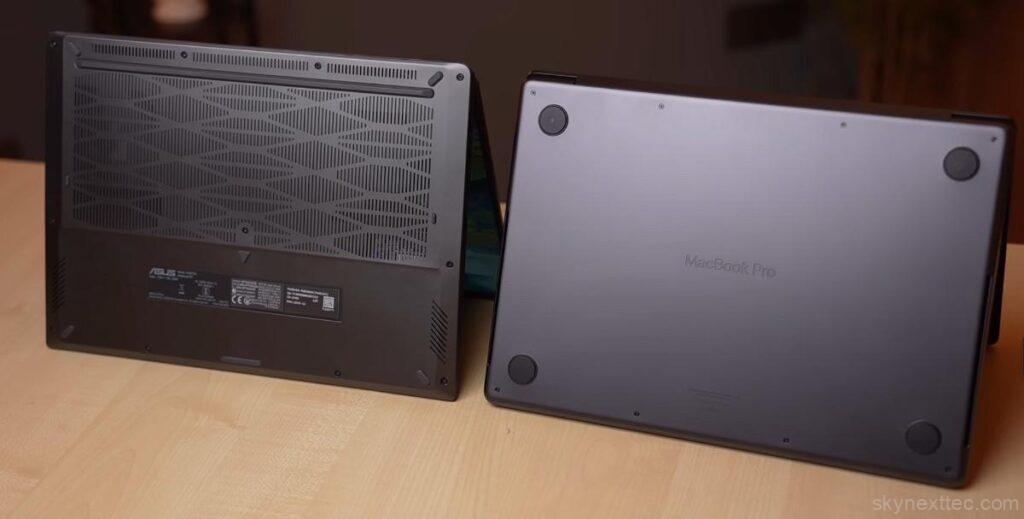
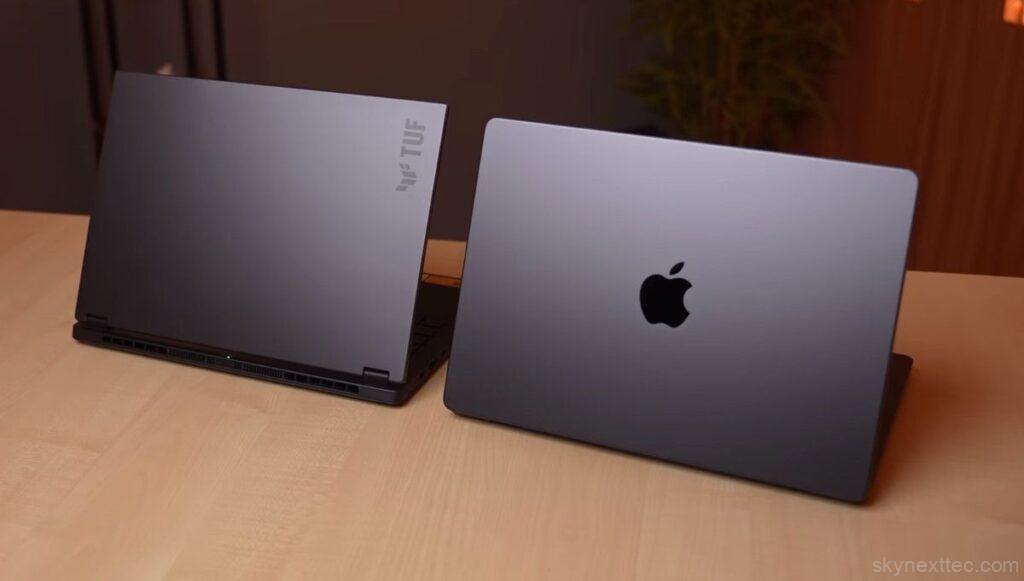
One of the main reasons to compare the Asus TUF A14 and the MacBook Pro M5 is their design. Both are 14-inch laptops, with similar size, around 1.5 kg weight, and nearly identical thin profiles, making them easy to carry.
When it comes to build quality, the MacBook clearly feels more premium with its full metal body and smooth curved edges, giving it a refined in-hand feel.
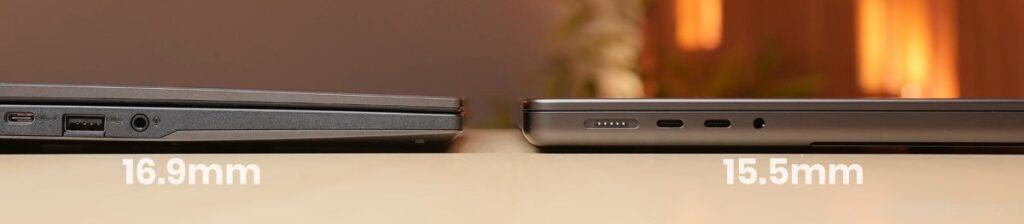
The TUF A14 also uses metal on the top and bottom, but the keyboard deck is polycarbonate, which slightly reduces that premium touch. Its design is clean and minimal, but the finishing isn’t as polished.
Both laptops follow a minimal design language, but in terms of premium feel and finish, the MacBook still has the edge.
Thermals
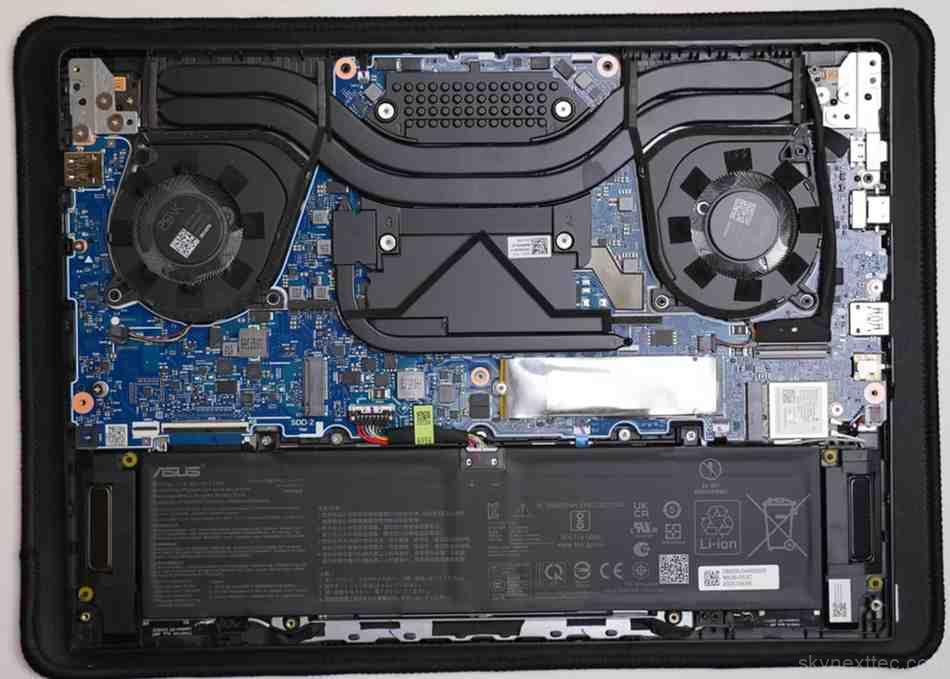
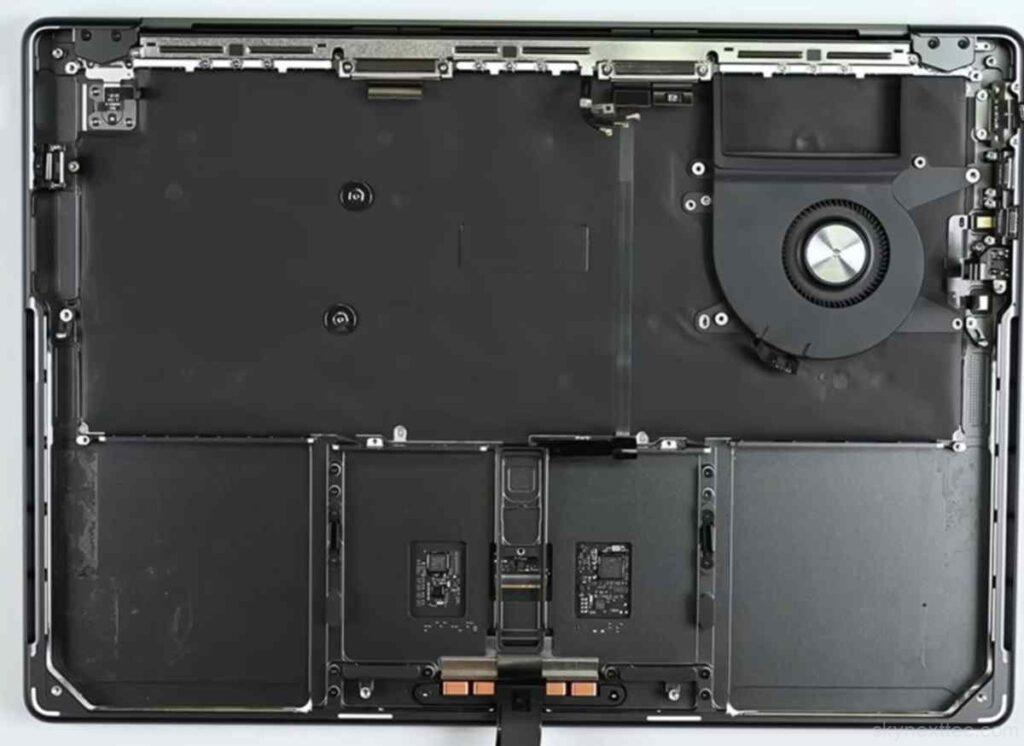
Both the Asus TUF A14 and MacBook Pro M5 use different architectures, so their cooling systems behave differently.
The TUF A14 comes with dual fans, handling higher power draw, with bottom intake and rear exhaust. It also sits slightly raised due to thicker rubber padding, helping airflow.
The MacBook uses a single fan system with exhaust below the display. Its low-profile design keeps it flat on the table, focusing more on efficiency than airflow.
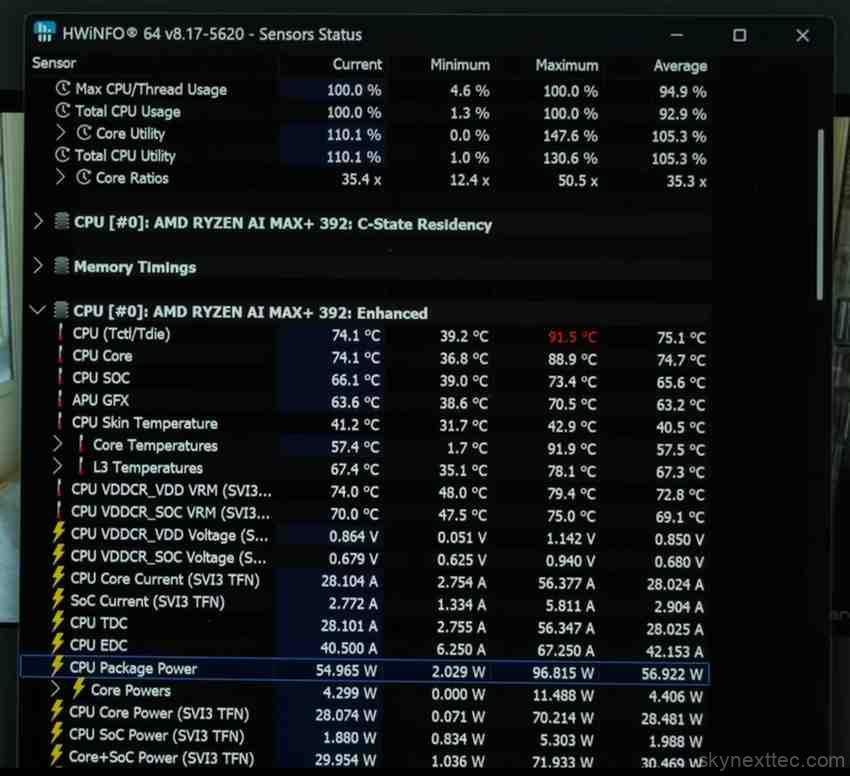
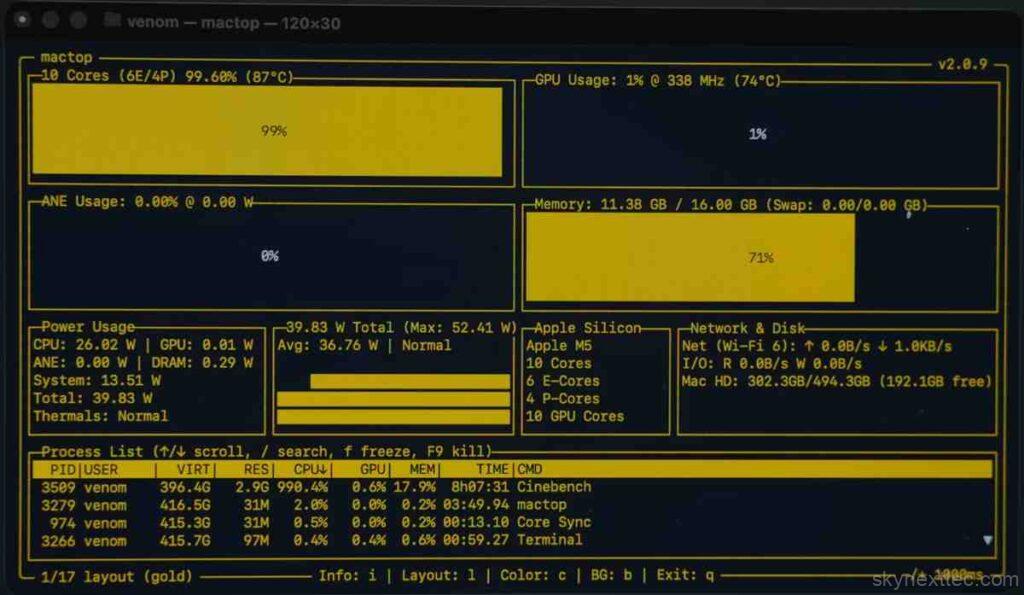
Under 100% load, the TUF A14 reaches around 74–75°C, with an average 55–57W power draw. In comparison, the MacBook Pro M5 goes up to 87°C, but with much lower ~26W power usage.
For keyboard temperatures, the TUF A14 stays cooler (~31–32°C on keys, 38°C near chipset), while the MacBook feels slightly warmer (~34–35°C on keys, 39–40°C near chipset).
Overall, the TUF A14 runs cooler under load, while the MacBook relies on efficiency over aggressive cooling.
Ports
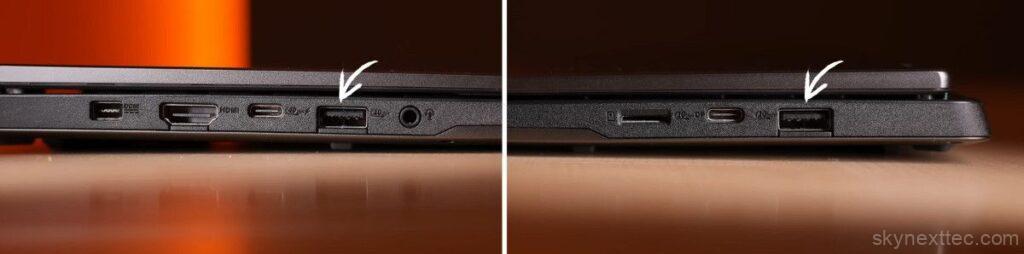
The MacBook Pro M5 offers a clean but limited port selection. You get Mag-Safe charging, three Thunderbolt 4 (USB-type-C) ports with power delivery and display output, a headphone jack, HDMI 2.1, and a full-size SD card slot.


The Asus TUF A14 focuses more on versatility. It includes two USB-A (3.2 Gen 2) ports, one USB-C (Gen 2) without power delivery, and one USB 4 Type-C with power delivery and display support. You also get a microSD card slot, HDMI 2.1, a 3.5mm combo jack, and a dedicated power input port.
In real use, the TUF A14 offers more flexibility, especially with USB-A ports and fewer adapter needs. With the MacBook, you’ll likely need a dongle or hub for older accessories.
Display
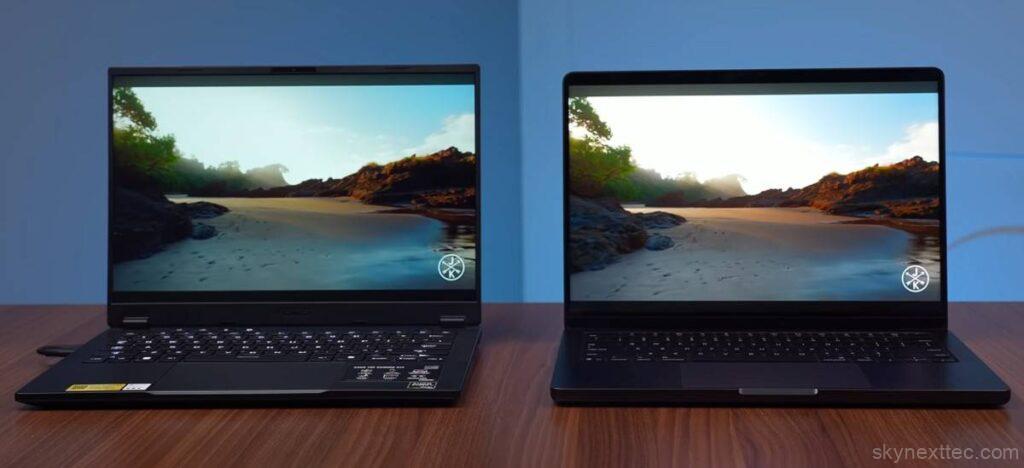
Both the Asus TUF A14 and MacBook Pro M5 feature a 14-inch display, but the technology is very different.
The TUF A14 uses an IPS anti-glare panel, which helps reduce reflections and is comfortable for long use. The MacBook, on the other hand, uses a Liquid Retina XDR (mini-LED) display, offering a more premium viewing experience, though it has a glossy finish.
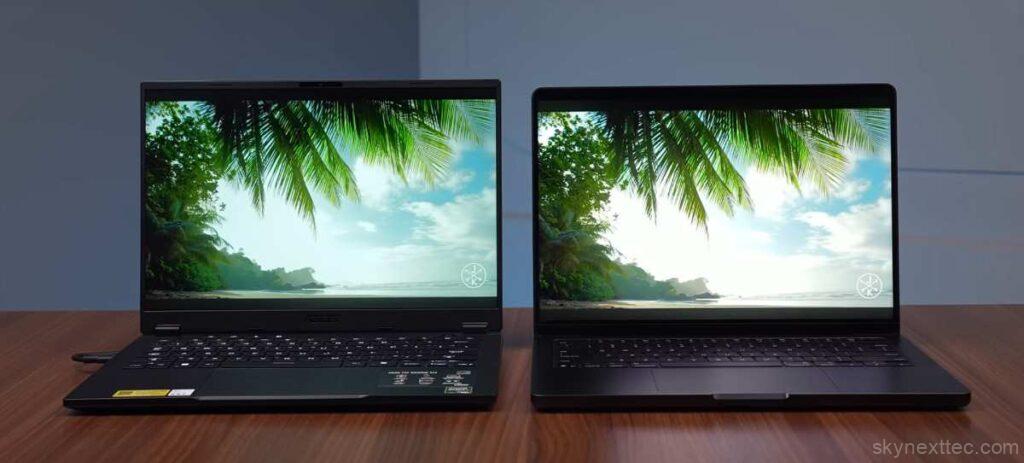
In terms of refresh rate, the TUF A14 offers 165Hz with FreeSync Premium, while the MacBook has 120Hz ProMotion with a dynamic refresh rate. Both feel smooth in daily use.
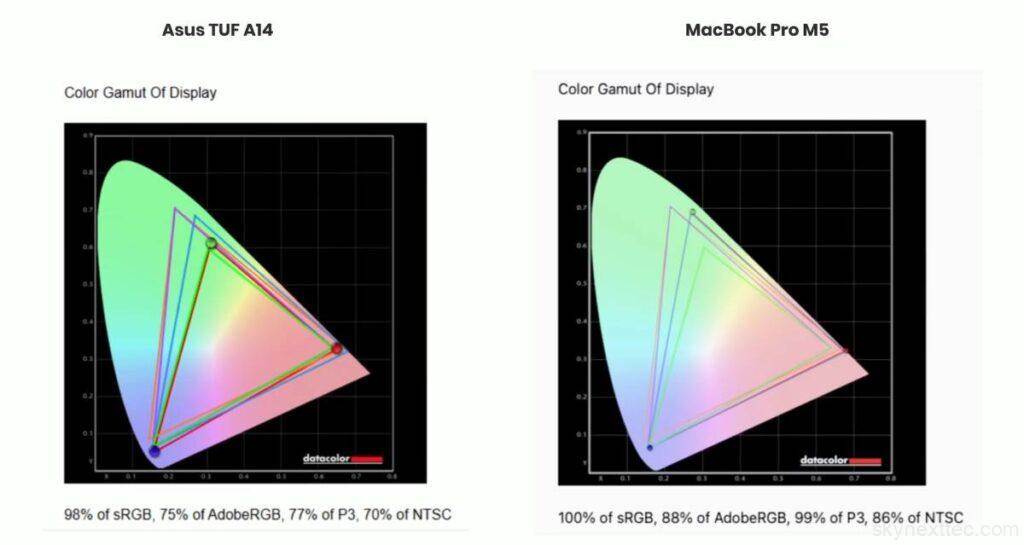
For color accuracy, the MacBook clearly leads with near 100% sRGB and around 99% DCI-P3, along with better AdobeRGB and NTSC coverage. The TUF A14 also delivers close to 100% sRGB, but isn’t as strong in wider color gamuts.
Asus TUF A14 – Brightness, Contrast & White Point
| Setting | Brightness (nits) | Black | Contrast | White Point |
|---|---|---|---|---|
| 0% | 19.5 | 0.01 | 1360:1 | 6800 (0.309, 0.324) |
| 25% | 79.8 | 0.07 | 1110:1 | 6800 (0.308, 0.324) |
| 50% | 172.6 | 0.16 | 1090:1 | 6800 (0.307, 0.325) |
| 75% | 294.2 | 0.27 | 1070:1 | 6900 (0.307, 0.325) |
| 100% | 444.0 | 0.40 | 1100:1 | 6900 (0.306, 0.325) |
MacBook Pro M5 – Brightness, Contrast & White Point
| Setting | Brightness (nits) | Black | Contrast | White Point |
|---|---|---|---|---|
| 0% | 0.0 | 0.01 | 0:1 | 0 (0.018, 0.161) |
| 25% | 4.5 | 0.01 | 310:1 | 6900 (0.307, 0.324) |
| 50% | 153.9 | 0.06 | 2620:1 | 6800 (0.308, 0.325) |
| 75% | 378.3 | 0.09 | 4280:1 | 6700 (0.309, 0.326) |
| 100% | 650.9 | 0.10 | 6330:1 | 6700 (0.309, 0.326) |
Brightness is another big difference. The TUF A14 reaches around 444 nits, while the MacBook goes up to ~650 nits, with HDR peak brightness up to 1600 nits (in specific scenarios). The TUF also lacks HDR support, while the MacBook supports HDR10, Dolby Vision, and more.
With thinner bezels, higher brightness, and better color accuracy, the MacBook Pro M5 display is the clear winner.
Speakers
The difference in audio quality between the Asus TUF A14 vs MacBook Pro M5 is quite noticeable.
The MacBook features a 6-speaker high-fidelity system, including subwoofers, delivering rich bass, clear treble, and excellent stereo separation. It creates a much more immersive experience for movies, music, and even video calls.
The Asus TUF A14 vs MacBook Pro M5 comes with dual down-firing speakers. While it does support Dolby Atmos, the overall output lacks depth and loudness.
Both support Dolby Atmos, but in real-world use, the MacBook’s speakers are on a completely different level.
Webcam & Mic
Both the Asus TUF A14 and MacBook Pro M5 offer a 1080p webcam, but the MacBook delivers noticeably better image quality and consistency.
In terms of microphones, the MacBook uses a 3-mic array, while the TUF A14 has dual mics. In real use, Apple’s setup provides clearer voice capture and better noise handling.
On the software side, both offer smart features. The TUF A14 includes auto framing, eye contact, and background effects. The MacBook goes further with Center Stage, Portrait mode, Studio Light, and advanced background controls.
One standout is Apple’s Desk View, which lets you show your workspace during meetings—a useful feature for presentations.
Overall, in terms of webcam quality, mic clarity, and smart features, the MacBook Pro M5 has the edge.
AI Features & OS
Both the Asus TUF A14 vs MacBook Pro M5 bring their own AI features and operating systems into the mix.
On the MacBook, you get Apple Intelligence, which includes live translation, smarter Siri, writing tools, and creative features like Image Playground. It focuses more on productivity and seamless integration across apps.
On the Windows side, the TUF A14 supports Copilot+ with a 40+ TOPS NPU, enabling features like Live Captions, Recall, Click-to-Do, and AI tools inside apps like Paint. In everyday use, it feels more accessible and user-friendly.
When it comes to the operating system, Windows offers more flexibility and freedom, making it easier to install apps or tweak settings. In contrast, macOS feels more polished, stable, and optimized.
The Apple ecosystem is another advantage—if you use devices like an iPhone, iPad, or Apple Watch, everything works seamlessly together.
Overall, Windows is more flexible, while macOS offers a more refined and premium experience.
Benchmark & Performance
Cinebench R23 Performance (Single vs Multi-Core)
Cinebench R23 Benchmark
In Cinebench R23, the Asus TUF A14 delivers stronger multi-core performance, especially in Turbo mode, while the MacBook Pro M5 leads in single-core performance.
Geekbench 6 Results (Real-World CPU Power)
Geekbench 6 Benchmark
In Geekbench 6, the MacBook M5 performs very well, reaching near Turbo-level performance of the TUF even on battery, showing strong efficiency and optimization.
AI Benchmark Performance (NPU & GPU Comparison)
Geekbench AI (ONNX vs Core ML)
For AI benchmarks, both use different frameworks—Core ML (MacBook) and ONNX (Windows). In raw numbers, performance is close, but Turbo mode gives the TUF A14 an edge.
Real-World AI Testing (Local Model Performance)
In real-world AI workloads, the TUF A14 performs better due to its 32GB RAM. It handled large models faster, while the MacBook (16GB RAM) struggled with heavier tasks.
3D Rendering Performance (Blender & BMW Test)
Blender Benchmark (Render Time – Lower is Better)
In Blender and rendering tests, the MacBook performs better due to stronger software optimization, completing renders in less time.
BMW Render Test (Lower is Better)
Video Editing Performance (Premiere Pro & After Effects)
PugetBench for Creators (Higher is Better)
In video editing, performance is similar in Premiere Pro and Photoshop, but the MacBook performs better in After Effects and long sessions due to better stability and optimization.
Performance on Battery vs Charging
The MacBook delivers consistent performance on both battery and charging. The TUF A14 performs well on battery but unlocks higher power in Turbo mode when plugged in.
Power Draw & Efficiency (Performance per Watt)
The MacBook runs at around 45W, delivering excellent performance-per-watt. The TUF A14 can go up to 85W in Turbo mode, giving higher raw performance but lower efficiency.
Gaming
When it comes to gaming, Windows laptops clearly have the advantage.
The Asus TUF A14 delivers strong gaming performance, even without a dedicated GPU, thanks to its powerful integrated graphics and higher power limits.
On the MacBook Pro M5, native macOS games like Cyberpunk 2077 and Death Stranding are starting to appear. You can also run some Windows games using tools like CrossOver, but the performance is still not comparable to Windows at the same price.
Simply put, this isn’t a fair fight. For gaming, the TUF A14 is the clear winner.
Battery
When comparing battery life of Asus TUF A14 vs MacBook Pro M5, this is where the MacBook Pro M5 clearly stands out.
Both laptops have similar battery capacity—73Wh (TUF A14) and 72.4Wh (MacBook)—but real-world results are very different.
In day-to-day usage like multitasking, video playback, and browsing, the MacBook delivers around 16–18 hours at 50% brightness, while the Asus TUF A14 lasts about 11–12 hours. That 3–4 hour difference is significant for productivity users.
Under heavy workloads, battery life drops on both, but the MacBook remains more efficient.
For charging, the MacBook includes a 70W charger and takes about 1 hour 25 minutes to fully charge. The TUF A14 comes with a larger 200W charger and takes around 1 hour 40 minutes.
Overall, while(Asus TUF A14 vs MacBook Pro M5) charging speeds are similar, the MacBook wins in battery efficiency and backup.
Pricing
| Laptop | RAM | Storage | USA (USD) | Canada (CAD) | UK (GBP) | Buy |
|---|---|---|---|---|---|---|
| Asus TUF A14 (2026) | 32GB | 1TB | $2,150 | $2,900 | £1,700 | Buy |
| MacBook Pro M5 (16GB) | 16GB | 512GB | $1,920 | $2,600 | £1,520 | USA CA UK |
| MacBook Pro M5 (24GB) | 24GB | 512GB | $2,500 | $3,350 | £2,000 | USA CA UK |
| MacBook Pro M5 (32GB) | 32GB | 512GB | $2,740 | $3,700 | £2,200 | USA CA UK |
Conclusion
Both the Asus TUF A14 vs MacBook Pro M5 are premium laptops priced in a similar range, and each excels in different areas.
If your focus is gaming, higher raw performance, and flexibility, the TUF A14 makes more sense. It offers better value for power, especially if you’re okay with slightly lower battery life.
On the other hand, if you prefer macOS, need strong battery life, and want a more polished experience, the MacBook Pro M5 is the better choice. It performs consistently, especially for creative work and long sessions.
For display, speakers, webcam, mic, and overall premium design, the MacBook clearly leads. However, in terms of ports and upgrade flexibility, the TUF A14 has the advantage.
If you’re already in the Apple ecosystem, the MacBook is an easy recommendation. If you need power, gaming, and versatility, go with the TUF A14.
In the end, it comes down to your use case:
- Gaming & performance → TUF A14
- Battery, ecosystem & experience → MacBook Pro M

